

The Promise vs. The Reality
Every vendor pitch is the same: “AI will automate experimentation and 10x your conversions.” Ten years in the e-commerce and D2C trenches taught me a brutal lesson: growth doesn't stall because you run out of hypotheses; it stalls because you're drowning. I was spending 15+ hours a week in the 'data sewers'—fixing broken funnels and manual cohorts—while my winning ideas sat gathering dust on a Trello board.
I built ICA (Intelligent Conversion Analyst)—a multi-agent system using CrewAI, GPT-5, and Snowflake—to reclaim that time.
Three months in, the system works. But it also fails spectacularly in ways the marketing blogs never mention. This is the practitioner’s guide to the “messy middle” of AI implementation.
The ICA Architecture: A Specialized Workforce, Not a “God Model”
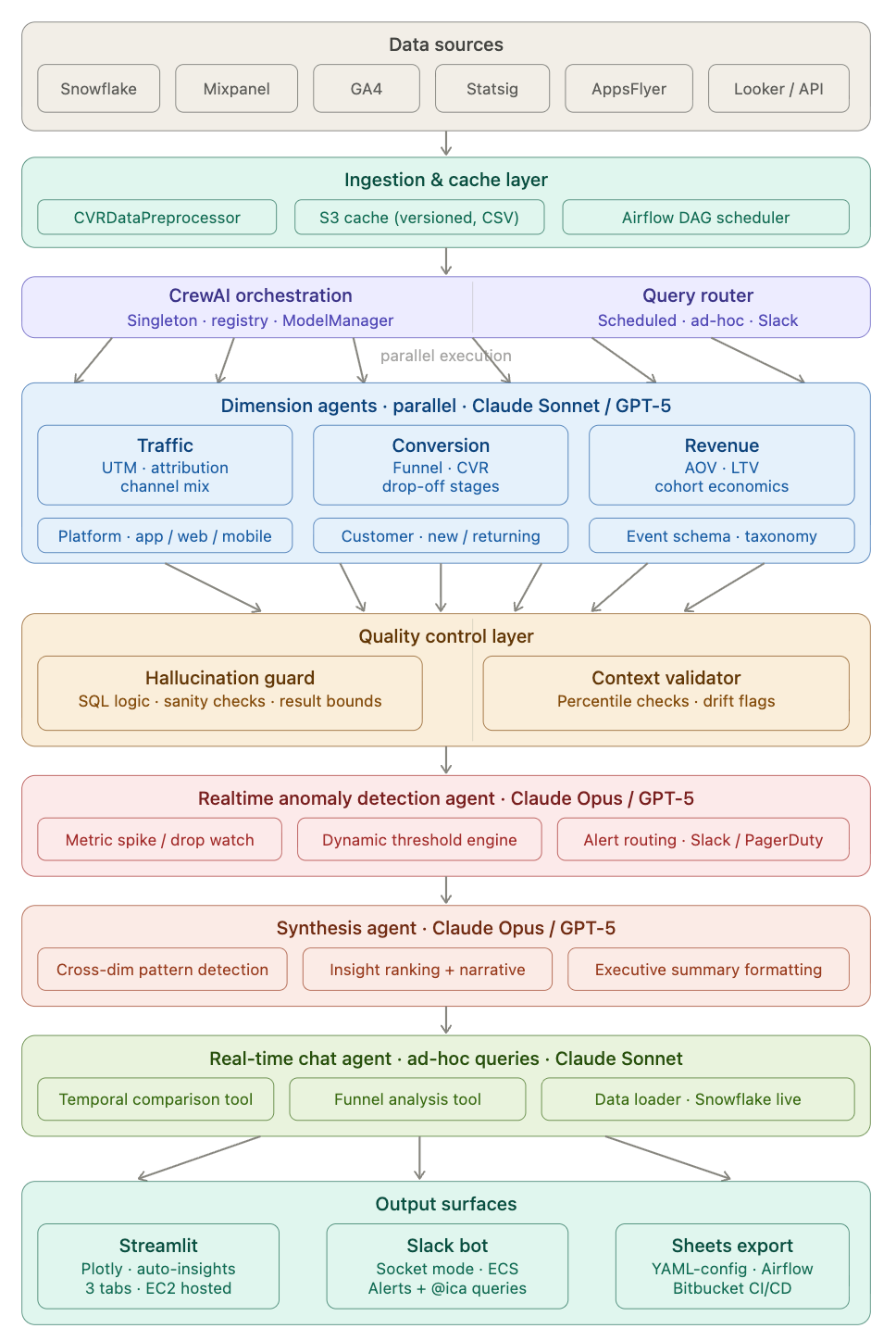
Instead of relying on a single generalist model, I built a modular, multi-agent workforce using CrewAI to orchestrate interactions between Claude and GPT models, integrated directly with our Snowflake data stack.
This hierarchical approach is crucial for accuracy. Single-agent systems trying to generate SQL and synthesis simultaneously are prone to complex hallucinations. By splitting core responsibilities, introducing parallel processing, and enforcing validation, I reduced bad outputs from ~30% to ~7%.
Here is the breakdown of the ICA architecture:
1. The Core Execution Layer: Parallel Dimension Agents
After data is preprocessed from sources like Snowflake, GA4, and AppsFlyer, the requests pass through our Query Router. We then employ three specialized Dimension Agents (powered by Claude Sonnet or GPT-5) executing in parallel:
Traffic Agent: Owns platform logic across app, web, and mobile, focusing on Attribution, UTM logic, and channel mix.
Conversion Agent: Decodes funnel metrics for new vs. returning customers, identifying Funnel/CVR drop-off stages.
Revenue Agent: Maps cohort economics based on specific event schemas, analyzing AOV, LTV, and revenue.
2. The Validation Layer: Dual Quality Control
Before any data moves toward the final report, it must pass a rigorous Quality Control Layer, ensuring that the insights are statistically sound and logically sound.
Hallucination Guard: This agent acts as a syntax validator, checking SQL logic, performing sanity checks, and validating result bounds to prevent imaginary numbers from surfacing.
Context Validator: This agent ensures data integrity over time, performing percentile checks and setting drift flags to catch anomalous data patterns before they skew the results.
3. Realtime Intelligence: Anomaly Detection
Sitting above the core analysis agents is a proactive Realtime Anomaly Detection Agent (powered by Claude Opus or GPT-5). It actively watches for metric spikes or drops, utilizes a dynamic threshold engine, and handles alert routing directly to Slack and PagerDuty.
4. The Narrative Layer: Synthesis Agent
The output of the Dimension Agents and the QC layer is then handed to a high-level Synthesis Agent (Claude Opus/GPT-5). This is the final translator, designed for:
Cross-dim pattern detection (finding non-obvious correlations).
Insight ranking + narrative creation (deciding “what matters”).
Executive summary formatting (turning data into business language).
5. Output Surfaces
The synthesized insights are delivered to the business through multiple channels based on the user’s needs:
Slack bot: (Powered by a dedicated Real-time Chat Agent for ad-hoc queries).
Streamlit Dashboard: EC2-hosted with interactive Plotly visuals.
Sheets export: Automated via Airflow and Bitbucket CI/CD.
Part 1: The High-Value Wins
Where does AI genuinely outperform a human analyst?
1. Speed-to-Insight for Standardised Queries
In a manual world, pulling week-over-week funnel performance by device type takes roughly two hours of SQL writing, debugging, and visualisation. AI reduces this to 15 minutes.
It’s not about “replacing” the analyst; it’s about removing the friction between asking a question and seeing the chart.
2. Proactive Anomaly Detection
AI doesn’t sleep. It can scan hundreds of metric combinations daily and flag the “fire” before you start your Monday morning coffee.
What it caught:
Checkout CVR dropped 8% → flagged payment gateway timeout spike
Organic traffic down 22% → flagged search algorithm update
Review submission rate plateaued → surfaced trend before it became critical
It won’t tell you why the payment gateway spiked, but it tells you exactly where to look.
3. Structural Scaffolding
AI is a world-class “first draft” generator. Whether it’s an experiment brief or a post-mortem report, it generates 80% of the structure in seconds. You spend your time on the 20% that requires business judgment.
Example output for testing social proof badges: The AI generated a complete hypothesis structure with primary metrics (Add-to-Cart rate, +3% MDE), secondary metrics (PDP view rate, time on page), guardrails (overall CVR, cart abandonment), sample size estimate (~45,000 visitors per variant), and duration (14 days). What I still needed to add: design mockups, engineering effort, prioritization rationale, and success threshold calibration.
Part 2: The Failure Modes (What the Vendors Hide)
If you trust AI blindly in a CRO context, you will eventually present “confident nonsense” to your CEO.
Failure Mode 1: The Logic Fan-Out (The Silent Killer)
AI is excellent at syntax but mediocre at logic.
What happened: I asked ICA for LTV by acquisition channel. The AI generated SQL that looked perfect—clean syntax, logical structure. I ran it.
The result: Paid Social LTV = $487. Organic Search LTV = $312.
I almost presented this to the exec team.
The actual result after manual validation: Paid Social LTV = $164. Organic Search LTV = $289.
What went wrong: The query joined customers to all their orders. For a customer with 5 orders, their revenue got counted 5 times. This is called a “fan-out join”—one of the most common and dangerous SQL errors. The LTV was inflated by nearly 3x.
The lesson: Never trust AI-generated revenue data without a programmatic validation layer. My hallucination guard now catches ~23% of SQL errors before they reach production. The other 77% would have shipped bad data.
Failure Mode 2: The Context Gap (The “So What?” Problem)
AI sees data, but it doesn’t have a calendar.
What happened: Marketing asked why checkout CVR spiked 12% on November 15th.
ICA’s response: “Checkout CVR increased from 3.2% to 3.6%. Drivers: Traffic +18%, Mobile sessions +22%. Recommendation: Investigate mobile UX improvements.”
Technically accurate. Completely useless.
What AI missed: November 15th was during a major shopping holiday. Traffic intent was fundamentally different—high-intent shoppers, promo-driven demand, gift purchases. The CVR spike wasn’t a “mobile UX improvement”—it was selection bias from different traffic composition.
The fix: Feed business context into prompts: holiday calendar, promo schedule, product launches, known site issues. Even then, AI still says “here’s what changed” not “here’s why it matters.”
The lesson: AI surfaces the “what.” Humans explain the “why.”
Failure Mode 3: Strategic Choice vs. Default Logic
Attribution is a business philosophy, not a math problem.
The scenario: User sees paid social ad → doesn’t click → returns via organic search 3 days later → purchases
Marketing’s question: “Should this be attributed to paid social (awareness) or organic search (conversion)?”
ICA’s answer: “Last touch. Organic search drove the conversion.”
Marketing’s reaction: “We disagree. Paid social drove awareness.”
The reality: There’s no objectively “correct” answer. Each attribution model tells a different story—Last-touch credits organic search, First-touch credits paid social, Linear splits 50/50, Time-decay weights toward recent touches. Each has different business implications for budget allocation, channel ROI, and team incentives.
The lesson: AI can calculate all attribution models. Only humans can decide which one aligns with business strategy.
Failure Mode 4: The Traffic Reality Check
What happened: I asked Claude for experiment ideas to improve review submission rate.
AI suggestion: “Test gamified review submission with points/badges. Expected lift: +15%. Priority: High.”
Sounds great! Except our review page gets ~800 visitors/day. To detect a 15% lift with statistical significance requires ~18,000 visitors per variant = 45 days. Plus 4 weeks of engineering to build the feature.
Total: 3 months for one experiment that might not win.
Meanwhile, a simpler test (timing of review request email) could run in 7 days with existing infrastructure.
Why AI fails: It doesn’t understand traffic volume, engineering constraints, opportunity cost, or velocity requirements. It generates theoretically interesting ideas divorced from practical reality.
The fix: Use ICE prioritization (Impact, Confidence, Ease). AI generates ideas. Humans score and prioritize.
Failure Mode 5: Brand Voice Doesn’t Compute
The test: AI-generated headline variants for bedsheet A/B testing.
Control: “Premium Linen Bedsheets – Luxury Sleep Experience”
AI variant: “Experience Ultimate Comfort with Our Premium Linen Bedsheets – Perfect for a Luxurious Night’s Sleep!”
Technically optimized (benefit, emotion, specificity). Completely soulless.
Human copywriter: “The sheets that spoiled hotel sleep for you”
Same benefit (luxury). Way more personality. +18% CTR vs. control. AI variant was flat.
Why it happens: AI trained on generic e-commerce copy produces generic e-commerce copy. It doesn’t know your brand voice, customer language, or positioning.
The fix: Use AI for first drafts (volume), copywriter refines (voice). Or feed AI your brand guidelines and past winners. Quality improves ~40%.
The AI + CRO Maturity Model
Most teams fail because they try to jump straight to “full automation.” Use this roadmap instead:
Level 1: Ad-Hoc Assistance
Using ChatGPT to summarize experiment results or brainstorm test ideas. Works for one-off questions and personal productivity. Breaks at reproducibility, scale, and trust. Time investment: 30 minutes. Adoption: Individual contributors only.
Level 2: Standardized Frameworks
Shared library of tested prompts for consistency. Works for team alignment and consistent quality. Breaks at complex workflows and data integration. Time investment: 2-4 weeks to build. Adoption: 40-60% of team.
Level 3: Custom Agents (ICA Territory)
Multi-agent systems integrated with your data warehouse. User asks question in Slack → Agent generates SQL → Executes query → Validates results → Returns formatted report. Works for repetitive workflows, production analytics, and scale. Breaks at edge cases, novel analysis, and strategic questions. Time investment: 2-3 months to build. Adoption: 70-80% for defined use cases.
Level 4: The Hybrid System (The Goal)
AI handles well-defined tasks. Humans handle judgment calls. Clear handoff points. Example workflow: AI generates weekly funnel report → AI flags anomalies → Human investigates root cause → AI generates hypothesis options → Human prioritizes experiments → AI drafts experiment brief → Human refines + approves.
Key insight: Not “AI does everything” but “AI does what it’s good at, humans do what AI can’t”
Time investment: 4-6 months. Adoption: 90%+ (it becomes the workflow).
What Actually Makes AI Useful for CRO
After three months of building, breaking, and fixing, here’s what separates useful tools from expensive toys:
Clear scope. Don’t ask AI to “optimize our funnel.” Ask it to “generate SQL analyzing checkout abandonment by payment method for last 30 days.” Narrow, well-defined tasks work. Vague strategic requests fail.
Validation layers. Never trust raw AI output. My hallucination guard catches ~23% of errors. Build schema validation (does this table exist?), logic validation (does this make sense?), result validation (are these numbers plausible?), and human spot-checks.
Business context. Feed AI your tracking plan, schema docs, metric definitions, business calendar, and experimentation framework. The difference between “CVR dropped 12%” and “CVR dropped 12% because it’s Black Friday” is context AI doesn’t have unless you give it.
Version control. Store prompts in git. Tag versions. Document changes. When Week 8’s query returns different results than Week 1, you need to know what changed. Lock model versions to prevent drift.
Human-in-the-loop. AI proposes, humans decide. For experiment prioritization: AI generates 10 ideas → human scores on ICE → pick top 3 → AI drafts briefs → human refines → ship.
Document failures. Know where it breaks. My runbook: SQL generation works for simple aggregations but fails on complex joins, so humans review anything touching revenue. Attribution calculations work, but choosing which model requires stakeholder alignment. Hypothesis generation needs observation data (heatmaps, research) to avoid generic output.
The Brutal Truth
AI will not replace CRO practitioners. It will, however, separate practitioners who understand its limitations from those who treat it as magic.
What AI does well:
Repetitive SQL generation (with validation)
Data summarization and report formatting
Experiment brief scaffolding
Pattern recognition in structured data
Copy variant generation (first drafts)
What AI fails at:
Understanding why metrics moved
Making strategic trade-offs (attribution models, test prioritization)
Generating insight without observation
Capturing brand voice and nuance
Handling edge cases and context
The Path Forward: Intelligent Augmentation
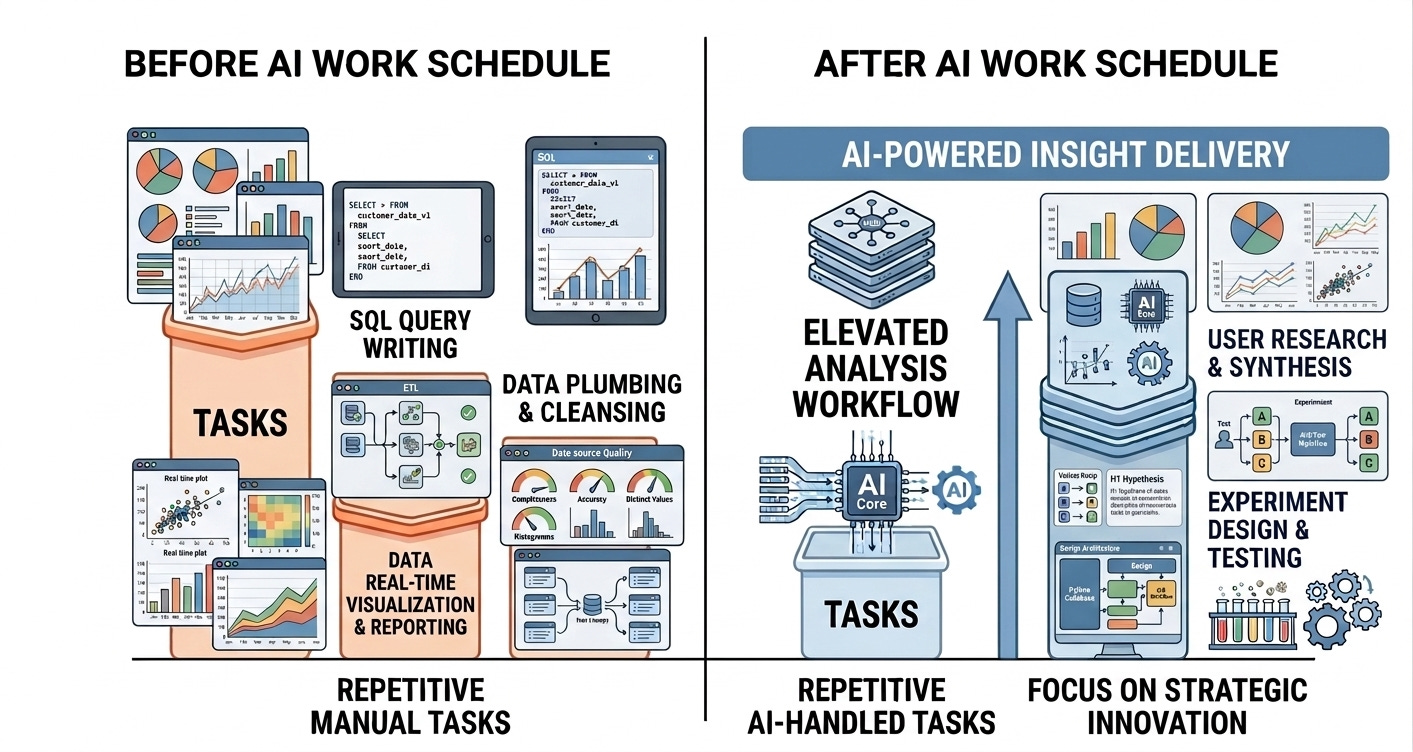
The goal isn’t “AI does CRO for me.” The goal is AI making you 10x faster at parts that don’t require strategic thinking, freeing time for parts that do.
My week before ICA: Monday (3 hours on funnel reports), Tuesday (2 hours pulling LTV cohorts), Wednesday (90 minutes on experiment briefs), Thursday (2 hours investigating metric drops), Friday (ad-hoc requests).
My week now: Monday (ICA generates funnel report in 15 min), Tuesday (I investigate why CVR dropped—2 hrs, AI can’t do this), Wednesday (ICA scaffolds briefs, I add context—30 min), Thursday (I prioritize experiments strategically—1 hr, AI can’t do this), Friday (I design winning experiments—2 hrs, AI can’t do this).
Time saved: ~7 hours/week
Time redirected: Deep investigation, strategic prioritization, experiment design
That’s the unlock.
By automating the “data plumbing,” I didn’t work less. I redirected those hours into user research, competitive analysis, and high-level strategy—the things AI still can’t touch.
How to Get Started
If you’re implementing AI for CRO, here’s the four-phase playbook:
Phase 1 : Start Small. Pick ONE repetitive task (weekly reporting, brief generation, SQL queries). Build 3-5 tested prompts. Iterate. Success metric: 50% time savings on that task.
Phase 2 : Add Validation. Build guardrails: spot-checks, schema validation, sanity checks, peer review. Document where AI fails. Success metric: Zero bad outputs to stakeholders.
Phase 3 : Expand Scope. Add 2-3 adjacent use cases. Share prompts with team. Measure adoption. Success metric: 60%+ team usage.
Phase 4 : Automate Workflows. Build custom agents if needed, or stick with prompts (80% of teams don’t need custom agents). Success metric: 10+ hours/week saved per analyst.
Final Thoughts
I’ve spent three months building AI systems for CRO. Here’s what I’d tell my past self:
Don’t believe the hype. AI is useful, not magic.
Start with prompts, not platforms. Well-tested prompts solve 80% of problems.
Validate everything. AI hallucinates confidently. Build guardrails.
Feed context. Generic prompts get generic output.
Know the limits. AI can’t make strategic decisions or understand “why.”
Treat prompts like code. Version, test, maintain.
Human-in-the-loop always. AI proposes, human decides.
The future of CRO isn’t “AI does everything.” It’s “AI handles repetitive tasks, humans focus on strategy.”
Build systems that make you 10x faster at what AI can do, so you have more time for what AI can’t.